// architecture · v0.3.0
How it's built.
Rust inside, web on top.
A tour of the architecture, the technology choices and the reasons behind them. Written for anyone who knows software but not necessarily Rust.
// overview
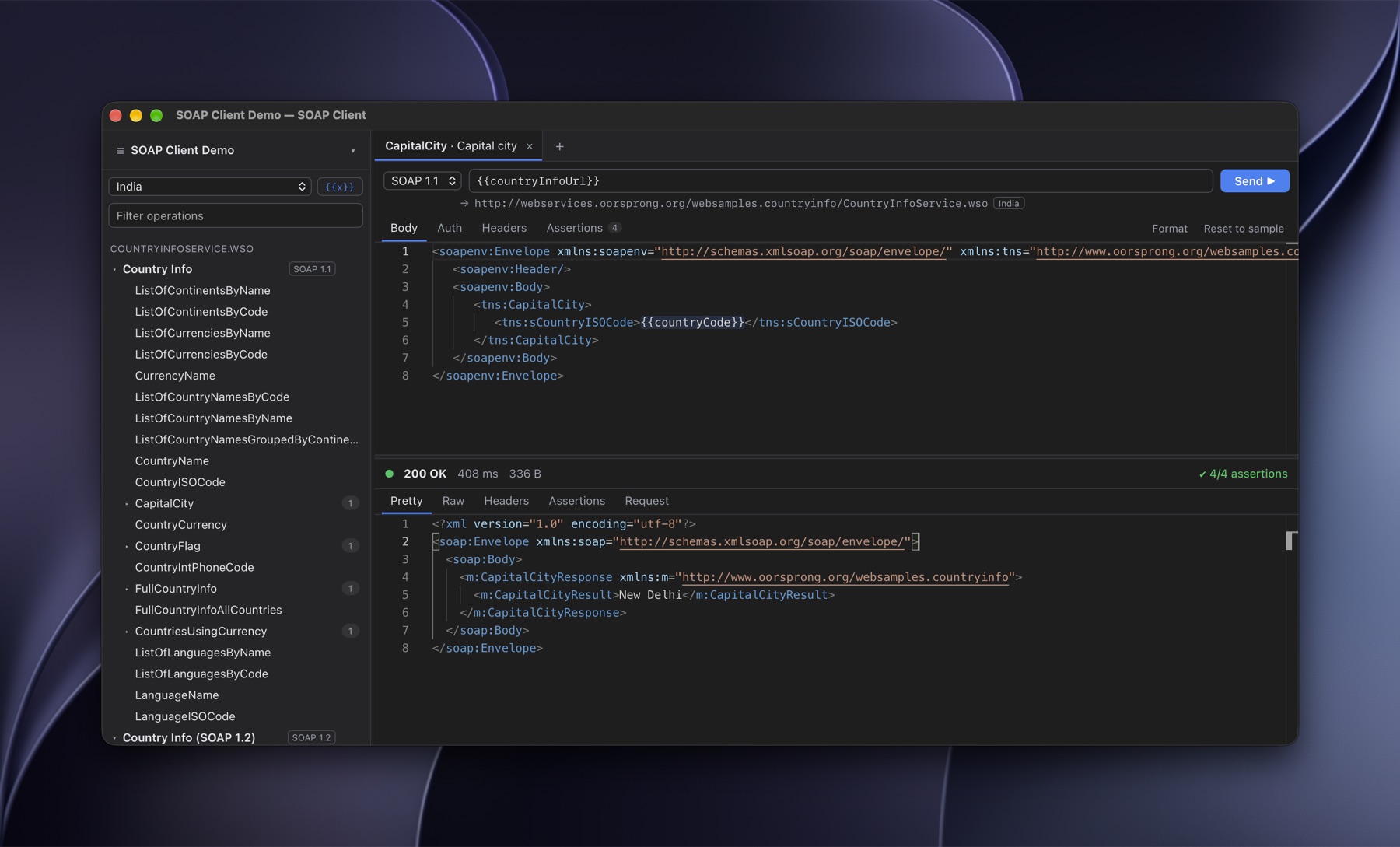
Import a WSDL, get a request for every operation, send it, check the response.
A WSDL is the XML file that describes a SOAP service. SOAP Client reads it, along with every schema it imports, and writes a ready-to-edit sample request for each operation. You fill in values, press Send, and the response comes back with automatic checks: status code, XPath, no SOAP Fault, response time. While you edit, the request is checked against the WSDL and its schemas. Around that loop sit environments and {{variables}}, HTTP Basic and WS-Security, secrets in the system keychain, autosave and shareable project files.
// three layers in one app
The app is one native program with a web page inside it. The page draws the interface; Rust does everything that touches the network, the disk or the keychain. They talk over Tauri's IPC bridge, which works like calling a local API. The Rust half is split again: a thin shell that knows about Tauri, and a core library that knows nothing about any UI.
Interface · Svelte 5 in the system webview
ui/src/invoke("send_request", …) JSON in, JSON out, plus events from Rust to the page. Guarded by a strict CSP and a capability list.
Shell · Tauri 2 application
src-tauri/src/Plain Rust calls: soap_core::http::send(&spec), project::import_wsdl(src).
Core · soap-core library
crates/soap-core/src/? placeholders{{name}}, XML-escaped in the body; spot mistyped onesHTTPS (rustls), files on disk, and the system credential store.
Outside the app
operating system and networkThe one rule that shapes everything: the project lives in the UI, the secrets live in Rust. The UI holds and edits the project as plain data and asks Rust to do work on it. Secret values go into the keychain through Rust and never come back out to the page.
// technologies and why
| piece | layer | used for | why this one |
|---|---|---|---|
| Rust | core shell | All logic that isn't drawing the UI | A small, fast native binary with no runtime to install. The compiler rules out null errors, data races and memory bugs, which matters for code that parses untrusted XML. |
| Tauri 2 | shell | Window, menus, dialogs, IPC, packaging | Uses the webview the OS already has instead of bundling Chromium like Electron, so downloads are a fraction of the size. The page can only call what it's explicitly allowed to. |
| Svelte 5 | ui | The interface | Compiles to plain JavaScript with no virtual DOM. Runes ($state, $effect) make one shared state object reactive. |
| TypeScript | ui | All UI code | types.ts mirrors the Rust structs, so a mismatched command is caught at build time. |
| Vite | ui | Dev server, bundler | Tauri's recommended tool. Hot reload during development; targets Safari 16 to match the macOS webview. |
| Monaco | ui | XML editing | VS Code's editor: highlighting, folding, find, per-tab undo. Only the base worker is loaded. |
| roxmltree | core | Reading WSDL, XSD and requests | Fast read-only XML tree with correct namespace handling and the position of every node, so validation warnings point at the right spot. Reading is all that's needed. |
| quick-xml | core | Pretty-printing | Streaming reader and writer, reformats a response without building a tree. |
| sxd-xpath | core | XPath assertions | One of the few pure-Rust XPath 1.0 implementations. |
| reqwest + rustls | core | HTTP | The standard Rust HTTP client, with TLS written in Rust instead of OpenSSL, so it behaves the same everywhere. HTTP/2, gzip and system proxy enabled. |
| tokio | core shell | Async runtime | A slow request never freezes the window, and tokio::select! makes Cancel possible. |
| serde | core shell | JSON | One #[derive] line converts a struct to and from JSON, for IPC and every file. |
| keyring | shell | Secret storage | One API over the macOS Keychain and Linux Secret Service. The Apple store adds the Touch ID policy. |
| sha1, base64, chrono, rand | core | WS-Security | PasswordDigest is Base64(SHA-1(nonce + created + password)), as the OASIS spec defines. |
| wiremock | tests | Integration tests | A fake HTTP server, so sending, redirects and imports are tested offline. |
Why split Rust into a core and a shell?testability
A Cargo workspace holds two crates. soap-core has no UI or Tauri dependency, so cargo test runs every WSDL, HTTP and assertion test without opening a window. src-tauri is the app; its commands are mostly one-liners into the core. A different front end, such as a command-line tool, could reuse the core unchanged.
Why Tauri and not Electron?size and security
Electron ships Chromium and Node.js in every app. Tauri uses the system webview and a Rust backend, so downloads are small and memory use is low. The page has no direct file or network access: it can only call the commands registered in lib.rs and the permissions in capabilities/default.json. The cost is that webviews differ by OS (WebKit on macOS, WebKitGTK on Linux), so Linux packages are install-tested on clean systems.
Why does the interface own the project?simplicity
Editing is constant, and keeping that state in Rust would mean an IPC round trip per keystroke. Instead the UI holds the project and sends a snapshot to save 700 ms after the last change. Rust keeps only three pieces of state: requests it may need to cancel, the secret store, and a lock for update preferences.
Why write a schema validator instead of using libxml2?no false alarms
A request is a template: it holds {{variables}} and ? placeholders that a strict validator would reject, and checking it after substitution would put secret values into messages. libxml2 is also a C library to build and ship on every platform, and it stops at the first error. The validator in xsd/validate.rs skips template values, reports every problem with its position, recovers after a mistake so one error doesn't cascade, and accepts anything it doesn't understand rather than reporting it. Everything except malformed XML is a warning, so it can never stop you sending.
Why one keychain item per project?fewer prompts
Every keychain read can make macOS ask for permission or Touch ID. So all of a project's secrets share one JSON "vault" item, read once and kept in memory until unused for 15 minutes. "Is this secret set?" is answered from a file that lists only key names, which never prompts.
// how things flow
Importing a WSDL
- ui
The import dialog takes a URL or file and calls
api.importWsdl(source). - shell
import_wsdlhands it tosoap_core::project::import_wsdl. - core
wsdl/loader.rsfetches it and follows everywsdl:import,xsd:import,includeandredefine, resolving relative paths against the final URL after redirects. Up to 250 documents of 20 MB each. - core
wsdl/parser.rsindexes all schema types, then flattens bindings, port types and services into interfaces with operations and endpoints. - core
xsd/sample.rswrites a sample envelope for each operation, reusing the WSDL author's prefixes and guarding against recursive types. - ui
The result, including the text of every imported document, is stored in the project, so it works offline afterwards.
Sending a request
- ui
Send collects the request and the active environment's variables. Secrets are passed as a keychain key, not a value.
- shell
send_requestrefuses a body that isn't well-formed XML, then finds which{{names}}are used and reads only those secrets. - core
vars::resolve_specsubstitutes them. Any undefined variable stops the send and is named, so nothing half-filled goes out. - core
http::prepareadds SOAP 1.1 or 1.2 headers and Basic auth or WS-Security; your own headers win. - core
http::sendposts it. Cancel races it withtokio::select!. - core
The response returns with timing, size, a pretty-printed body and a copy of the request with secrets shown as
••••••. - ui
run_assertionschecks it and the results appear beside the response.
Svelte UI     ── send_request(callId, spec, vars) ──▶  commands.rs
commands.rs   ── get(secret keys in use) ───────────▶  secrets.rs
secrets.rs    ◀── values (they stay in Rust) ─────────
commands.rs   ── resolve_spec + http::send ─────────▶  soap-core
soap-core     ── POST envelope ─────────────────────▶  SOAP server
soap-core     ◀── 200 OK · 408 ms ─────────────────────
Svelte UI     ◀── ResponseData (secrets masked) ──────
Svelte UI     ── run_assertions(list, response) ────▶  commands.rs
✓ 4/4 assertions passed
Checking a request as you type
- ui
300 ms after the last edit, the request pane calls
validate_requestwith the body, the operation and WSDL it came from, and the names of the defined variables, never their values. - core
validate.rsparses the body. Malformed XML is the only error, and it also blocks Send. - core
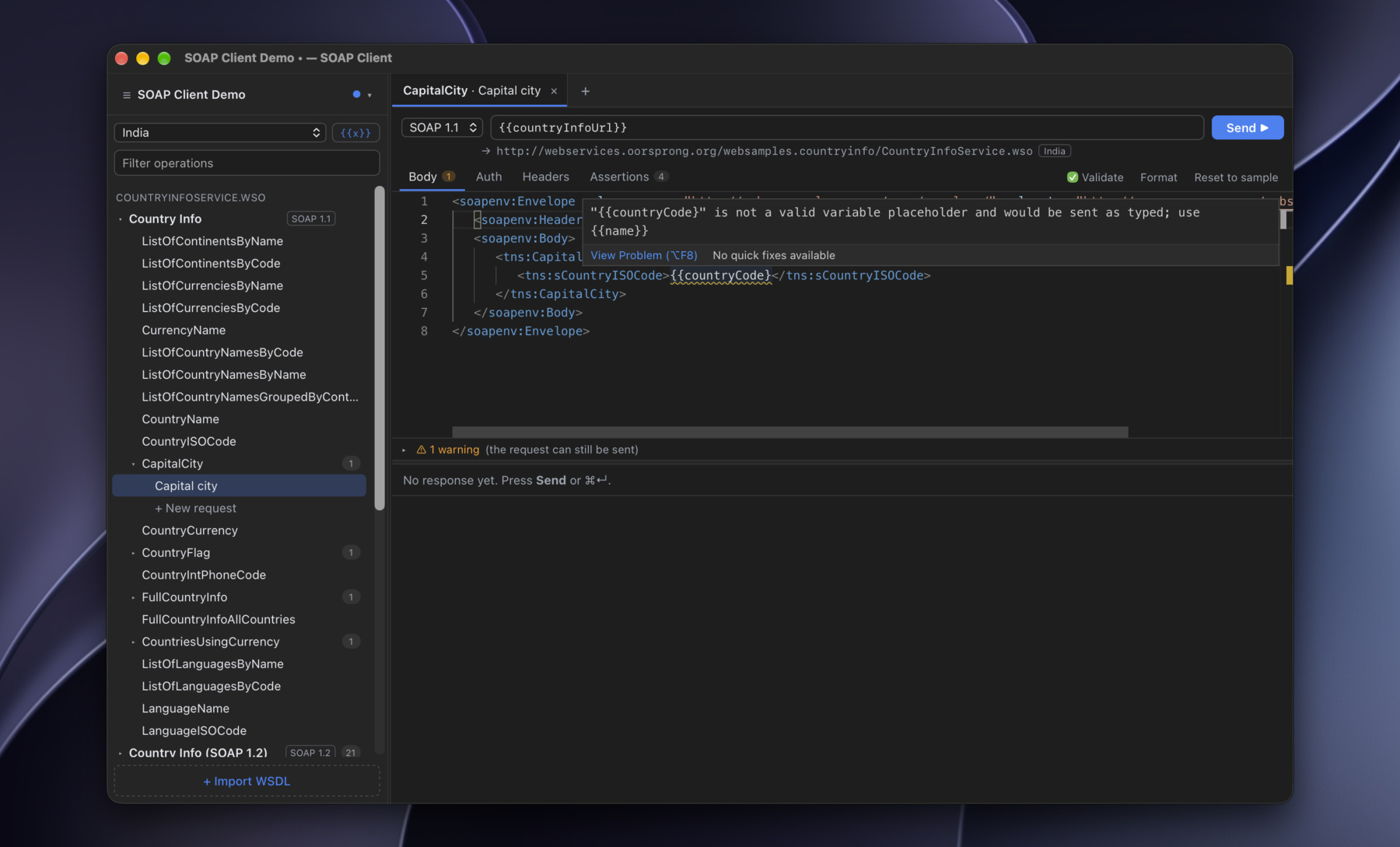
It flags mistyped placeholders such as
{{password}, then checks the envelope: SOAP version, SOAPAction, Header before Body, and the rpc wrapper and parts the operation expects. - core
xsd/validate.rswalks each part against the schema: order, how often each element may appear, namespaces, attributes.xsd/datatypes.rschecks values against their type and facets. - ui
Each issue comes back with its position and becomes an underline in Monaco and a line in the list below the editor.
Built not to cry wolf
- Everything except malformed XML is a warning. The request can always be sent, and the Validate toggle turns the checks off.
- Values containing
{{variables}}are skipped: they're only known at send time. Checking the template also keeps secret values out of messages. - Schema features it doesn't support, such as
patternfacets and SOAP-encoded types, are accepted rather than reported. - After a mistake it picks up again at the next element it recognises, so one misplaced element is one warning.
- Wrong values get a hint where possible: "usd" is not an allowed value. Did you mean "USD"?
// the rust core, file by file
| file | lines | responsibility |
|---|---|---|
| xsd/validate.rs | 1,141 | Walks a request against the schema: sequence, choice, all, groups, substitution groups, extensions and restrictions, attributes, xsi:type and xsi:nil. Recovers after a mistake; ignores what it doesn't support. |
| xsd/sample.rs | 400 | Sample XML from schema types: sequences, choices, attributes, extensions, groups; recursion guard at depth 40. |
| xsd/datatypes.rs | 380 | Built-in XSD types and facets: number ranges, digits, dates and durations, lengths, whitespace rules, allowed values. |
| wsdl/parser.rs | 321 | WSDL 1.1 into WsdlDocument → Interface → Operation, including the Body shape each operation expects. Document and RPC style; a clear error for WSDL 2.0. |
| validate.rs | 311 | Request checks: well-formed XML, mistyped placeholders, SOAPAction, SOAP version, envelope layout, rpc wrapper and parts. Hands each part to xsd/validate.rs. |
| http.rs | 305 | Request spec, auth, prepare (pure, easy to test), send, secret masking, redirect rules, 100 MB response cap. |
| vars.rs | 265 | {{ name }} scanning, substitution, list of values to mask, and spotting mistyped placeholders. |
| assertions.rs | 222 | The Check enum and evaluate. XPath can use any prefix in the response plus soap11/soap12. |
| update.rs | 211 | Version comparison, security-release flag, preferences file. |
| envelope.rs | 195 | SOAP version detection; inserts wsse:Security as a text edit so your formatting is kept. |
| project.rs | 186 | Project file format, import entry point, atomic writes via temp file and rename, 0600 permissions. |
| wsdl/loader.rs | 183 | Recursive import loader for files and URLs, with the security rules below. |
| xsd/mod.rs | 100 | SchemaIndex: global elements and types by qualified name. |
| wsdl/model.rs | 99 | The data shapes sent to the UI. |
| error · session · xml_fmt | 156 | Error enum, autosave file, pretty-printer. |
Unit tests sit in #[cfg(test)] blocks at the bottom of source files. Integration tests in crates/soap-core/tests/ run against WSDL fixtures: a calculator, an RPC service, a complex schema, and a multi-file WSDL with nested imports and a deliberately broken one, and an order service whose schema uses most of what the validator understands.
// what it defends against
Keeping secrets secret
- Secret values are never in project files, the session file or the UI. The UI can set, delete and ask "is it set?", nothing more.
- Wherever a sent request or an error is shown, secret values and their XML-escaped forms become
••••••. - Signed macOS builds require Touch ID or the Mac password to read secrets, and lock again after 15 idle minutes.
- A project file that isn't known to be yours must ask before it can use stored secrets.
- With no keyring available, secrets are kept in memory only, until quit.
Not trusting the network or the page
- SOAP requests follow redirects only to the same scheme, host and port, so headers and bodies can't leak elsewhere.
- WSDL downloads may redirect, but never from https to http.
- A WSDL from the web can't import
file://paths, and every import must be a schema or WSDL. - No
Refererheader, since URLs can hold secret variables. - Size limits on documents, import count and responses.
- Save and open accept only absolute
.jsonpaths. - A strict Content Security Policy: the page loads only its own scripts and talks only to the IPC bridge.
// where data lives
| what | where | contents |
|---|---|---|
| Project file | Wherever you save it, *.json | WSDLs with imported documents, requests, variables, environments. Secrets have a name but no value. Safe to share. |
| session.json | App data folder | Autosave of the project, open tabs and selection. |
| secret-index.json | App data folder | Names of keys that have a stored secret. No values. |
| updates.json | App data folder | Last check, auto-check setting, skipped version. |
| Keychain vault | Service dev.soapclient.app | One item per project holding its secrets. |
| localStorage | Inside the webview | Pane sizes, recent files, collapsed tree nodes, trusted project paths, the Validate toggle. |
The app data folder is ~/Library/Application Support/dev.soapclient.app/ on macOS and ~/.local/share/dev.soapclient.app/ on Linux.
// from source to installers
Day to day
npm install
npm run tauri dev    # Vite on :1420 + the Rust app
cargo test           # Rust tests
npm run check        # TypeScript and Svelte types
npm run tauri build  # installers in target/release/bundle/
In development the app loads the UI from Vite with hot reload. In a release build the compiled UI is embedded in the binary.
Releases
- macOS: one universal binary for Apple Silicon and Intel, signed with a Developer ID, notarized and stapled, checked by Gatekeeper, packed in a
.dmg. - Linux: GitHub Actions builds
.debfor amd64 and arm64 in an Ubuntu 22.04 container on every version tag, repackages it for Arch, and install-tests each on a clean system. - Versions: CI refuses a tag that doesn't match all four version fields.
- Updates: the app reads
latest.jsonfrom this site once a day. Nothing about you is sent.
// reading the code without knowing rust
These eight ideas cover nearly every line of the project, each shown with real code from it.
Crates, Cargo and the workspace
A crate is a package. Cargo is Rust's npm: Cargo.toml is the package.json, crates.io the registry. A workspace groups crates that build together.
# Cargo.toml
[workspace]
members = ["crates/soap-core", "src-tauri"]

# src-tauri/Cargo.toml
soap-core = { path = "../crates/soap-core" }
Structs and derive
A struct is like a TypeScript interface that holds data. #[derive(Serialize, Deserialize)] generates JSON conversion; rename_all = "camelCase" turns soap_action into soapAction to match the TypeScript side.
#[derive(Serialize, Deserialize)]
#[serde(rename_all = "camelCase")]
pub struct RequestSpec {
    pub endpoint: String,
    pub soap_version: SoapVersion,
    #[serde(default)]
    pub soap_action: Option<String>,
    pub body: String,
}
Enums carry data
Like TypeScript discriminated unions: each variant has its own fields. match handles every variant, and the compiler errors if one is missing.
#[serde(tag = "kind")]
pub enum Auth {
    None,
    Basic { username: String, password: String },
    WsSecurity(WsSecurity),
}

match &spec.auth {
    Auth::None => {}
    Auth::Basic { username, password } => { /* header */ }
    Auth::WsSecurity(sec) => body = apply_ws_security(&body, sec)?,
}
Option and Result
No null: a value that may be missing is Option<T>, either Some(x) or None. No exceptions: a fallible function returns Result<T, E>, either Ok or Err. A trailing ? means "if this failed, return the error now".
pub fn save_project(path: PathBuf, project: Project)
    -> Result<(), String>
{
    let path = project_path(path)?;   // bail unless .json
    project::save(&project, &path)
        .map_err(|e| e.to_string())
}
Ownership and &
Every value has one owner and is freed when the owner goes away; that's how Rust manages memory without a garbage collector. &x lends a value, &mut x lends it for changing, .clone() copies it. &str is borrowed text, String is owned text.
// borrows spec, doesn't take it
pub fn prepare(spec: &RequestSpec) -> Result<PreparedRequest> {
    let mut body = spec.body.clone();  // own copy to edit
    ...
}
async and tokio
async and .await work as in JavaScript, but Rust needs a runtime to run them: tokio. tokio::select! waits on several futures and takes the first to finish. That's the whole Cancel feature.
let result = tokio::select! {
    r = soap_core::http::send(&spec, &masked) => r,
    _ = rx => Err("Request cancelled".to_string()),
};
Tauri commands
#[tauri::command] makes a function callable from JavaScript, with arguments decoded from JSON. State<'_, T> arguments are injected by Tauri. Each command is also listed in generate_handler!.
// Rust
#[tauri::command]
pub fn format_xml(xml: String) -> Option<String> {
    soap_core::xml_fmt::pretty_print(&xml)
}

// TypeScript, ui/src/lib/api.ts
formatXml: (xml: string) =>
  invoke<string | null>("format_xml", { xml }),
Small things you'll see
pub is public. mod x; includes x.rs. use is import. #[cfg(target_os = "macos")] compiles code only on macOS. Mutex guards shared data across threads. |x| … is a closure. 'a is a lifetime, telling the compiler how long a borrow lasts; you can mostly skip it when reading.
#[cfg(target_os = "macos")]
apple-native-keyring-store = { … }

#[derive(Default)]
pub struct InFlight(
    Mutex<HashMap<String, oneshot::Sender<()>>>
);
// making changes
A reading order
ui/src/lib/types.ts: every data shape in one file.ui/src/lib/api.ts: everything the UI can ask Rust to do.src-tauri/src/commands.rs: what each of those does, in about 230 lines.crates/soap-core/src/http.rs: the heart of sending a request.ui/src/lib/state.svelte.ts: how the UI holds and changes the project.
Example: a new assertion type
- core
Add a variant to
Checkinassertions.rs. - core
Handle it in
evaluate; the compiler points at thematchuntil you do. - core
Add a test beside it and run
cargo test. - ui
Add the same shape to
Checkintypes.ts. - ui
Add its fields to
AssertionsEditor.svelteand runnpm run check.
No new command is needed, because run_assertions passes the whole list through. New backend work means a command in commands.rs, registered in lib.rs, with a wrapper in api.ts.
// glossary
- SOAP
- An XML protocol for calling remote services. Each message is an Envelope with an optional Header and a Body. Versions 1.1 and 1.2 differ mainly in namespace and content type.
- WSDL
- An XML file listing a service's operations, message formats, bindings and addresses. SOAP Client supports WSDL 1.1.
- XSD
- XML Schema: defines what elements and types look like. WSDLs embed or import schemas.
- Binding / port
- A binding ties operations to SOAP specifics; a port gives it an address. The app shows one interface per binding.
- Document / RPC
- Two body layouts: one schema element, or a wrapper named after the operation.
- SOAP Fault
- The standard error element a service returns when a call fails.
- WS-Security
- An OASIS standard for credentials in the SOAP Header; here, UsernameToken with text or digest passwords.
- XPath
- A query language for picking parts of an XML document.
- IPC
- How the page inside the app calls Rust and receives events.
- Webview
- A browser engine embedded in a window, without the browser around it.
- CSP
- Content Security Policy: what a page may load or connect to.
- Notarization
- Apple scanning a signed app so macOS opens it without a warning.
- Facet
- A rule that narrows an XSD type: a length, a range, a number of digits, a list of allowed values.
- Secret Service
- The freedesktop.org API that Linux keyrings implement.